
Text-Based Diagramming: Faster Technical Diagrams with Mermaid

Diagrams are an important part of technical communication. They help explain system behavior, clarify process flow, and make complex interactions easier to understand. However, creating and maintaining diagrams with traditional tools can slow down documentation, especially when small changes require manual alignment, arrow adjustments, or repeated formatting updates.
My experience with Mermaid syntax has shown me that technical diagrams do not always need to start with a blank canvas. They can begin as a text-based definition that describes the relationships, steps, or interactions in a system. That definition can then be rendered into a visual diagram using tools like Mermaid Live Editor, making it faster to create, review, and revise diagrams such as flowcharts and sequence diagrams.
How I Transitioned to Diagramming with Text
I first explored diagramming with text while working on sequence diagrams for a workflow that involved user interactions with a mobile device, a desktop application, and an IoT device. I originally used Draw.io to create several scenarios that showed how the systems interacted under different conditions.
Once the diagrams went through review, I needed to make updates across multiple scenarios. As the diagrams grew, the work shifted from refining the sequence logic to managing the layout. I spent more time aligning arrows, repositioning elements, and keeping each sequence readable than improving the technical content.
That frustration led me to look for a better approach. A co-worker introduced me to Mermaid-based diagram-as-code, and after trying it, I recreated the same diagrams in about half the time it took to build the originals. More importantly, later review comments became much easier to address because updates that could have taken hours in a traditional diagramming tool took only minutes in text.
Why the Approach Worked Well
The biggest advantage was speed. Because the diagram was defined with Mermaid syntax, I could make changes quickly and regenerate the visual output without reworking the diagram by hand. If a step needed to move, a relationship needed to change, or a flow needed to be adjusted, the update happened in the text first. The rendered diagram followed from that structure.
This made iteration much easier. In older diagramming workflows, a simple change could lead to extra cleanup: realigning arrows, moving boxes, and making sure the diagram still looked organized. With Mermaid syntax, the focus stayed on the diagram logic and communication instead of the mechanics of arranging shapes on a canvas.
A Simple Modification Example
The example below shows how a small change in Mermaid syntax can update both the sequence logic and the rendered visual output using Mermaid Live Editor.
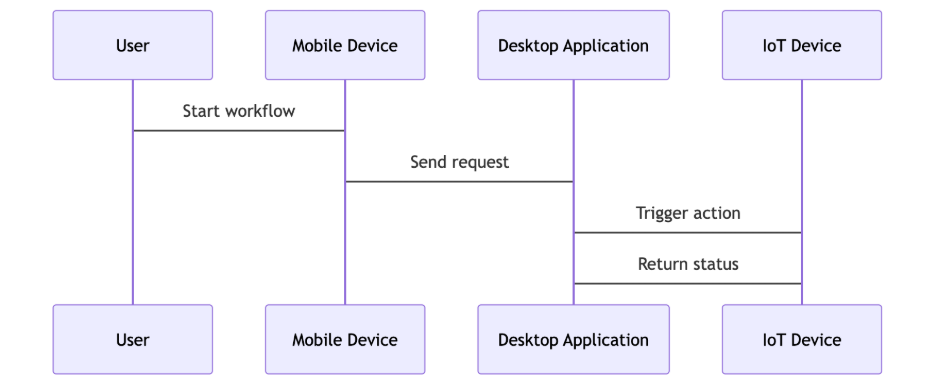
The original sequence diagram is generated from the following Mermaid syntax:
sequenceDiagram
	User -> Mobile Device: Start workflow
	Mobile Device -> Desktop Application: Send request
	Desktop Application -> IoT Device: Trigger action
	IoT Device -> Desktop Application: Return status
After multiple reviews, we identified two needed updates: send a confirmation status back to the mobile device and improve the visual clarity of the flow by using Mermaid’s solid arrow notation. With Mermaid, the update only required changing the arrow notation from -> to ->> and adding one new sequence line. The diagram then regenerated with the layout aligned automatically.
sequenceDiagram
	User ->> Mobile Device: Start workflow
	Mobile Device ->> Desktop Application: Send request
	Desktop Application ->> IoT Device: Trigger action
	IoT Device ->> Desktop Application: Return status
	Desktop Application ->> Mobile Device: Confirm status
The regenerated diagram reflects both updates without requiring manual layout adjustments. The important point is that the change is visible directly in the syntax: the arrows communicate message direction and style, while the added line captures the new confirmation step.
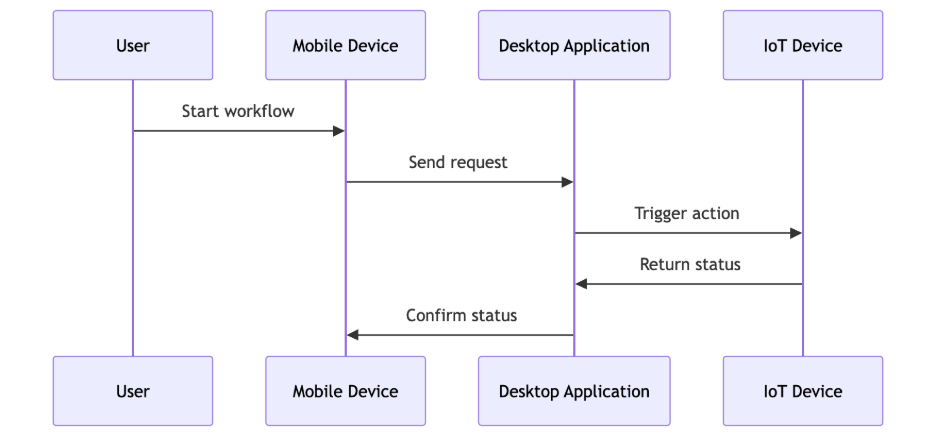
This illustrates the value of using text-based diagramming instead of relying only on traditional diagramming tools like Draw.io. In text, the change is localized, repeatable, and easier to review. In a canvas-based tool, the same change often requires adding the connection, repositioning existing elements, and manually adjusting spacing, so the diagram remains readable.
Where It Fits
Text-based diagramming is especially useful when the goal is to communicate structure quickly. Flowcharts are a natural fit for describing decisions, process steps, and workflows. Sequence diagrams are useful for showing interactions between systems, services, or users over time. In both cases, a text-based diagram definition can help keep the work lightweight and easy to revise.
For teams that regularly document software behavior, architecture, or process flows, this approach can also support more consistent communication. Because the diagram starts as syntax, it is easier to review, share, and update as the underlying design changes. The result is a flexible workflow for creating visuals that support technical discussions and documentation.
Text-based diagrams also fit naturally into source control. Because the diagram is represented as text, changes can be committed, reviewed, and compared like any other code or documentation update. This makes it easier for teams to understand how a diagram changed over time and include diagram updates in normal review practices.
AI-Assisted Diagram Generation
Another benefit of text-based diagramming is how well it can work with AI tools. Instead of writing every part of the diagram definition manually, I can describe the diagram I want in plain language and ask AI to generate a first draft of the syntax. This can make the starting point much faster, especially when the goal is to capture a process, interaction, or system flow quickly.
That said, AI-generated Mermaid syntax is not always functional on the first attempt. The syntax may need correction, the structure may need simplification, or the output may require a few rounds of trial and error before it renders properly. Even with that caveat, the process remains efficient because the work stays focused on refining the diagram logic instead of manually rebuilding the visual layout.
Tradeoff Summary
The table below summarizes where text-based diagramming tends to work best compared with traditional canvas-based tools such as Draw.io.
In practice, Mermaid and Draw.io are complementary tools: Mermaid is strongest when speed, version control, and maintainability matter most, while Draw.io remains useful when visual precision and presentation polish are the priority.
Recommendation
I would recommend Mermaid-based text-based diagramming for early design discussions, technical documentation, and diagrams that are expected to change over time. It may not replace traditional diagramming tools for highly polished visuals, but it is an efficient way to create clear diagrams quickly, iterate with less formatting overhead, and make diagram changes easier to review through source control.